
Built-in XDR brightness up to ~1600 nits
macOS · Liquid Retina XDR
Solara Display
MacBook Pro brightness up to 1600 nits. Menu bar only — no Dock icon.
Solara Display unlocks the software brightness ceiling on Liquid Retina XDR. macOS keeps the panel in SDR (~500–600 nits). Solara opens the full range: 100% ≈ 1600 nits.
Built by www.kompaniec.com · free
How it works
macOS caps the panel in SDR. Solara opens the full XDR range — great by a sunny window or on set.
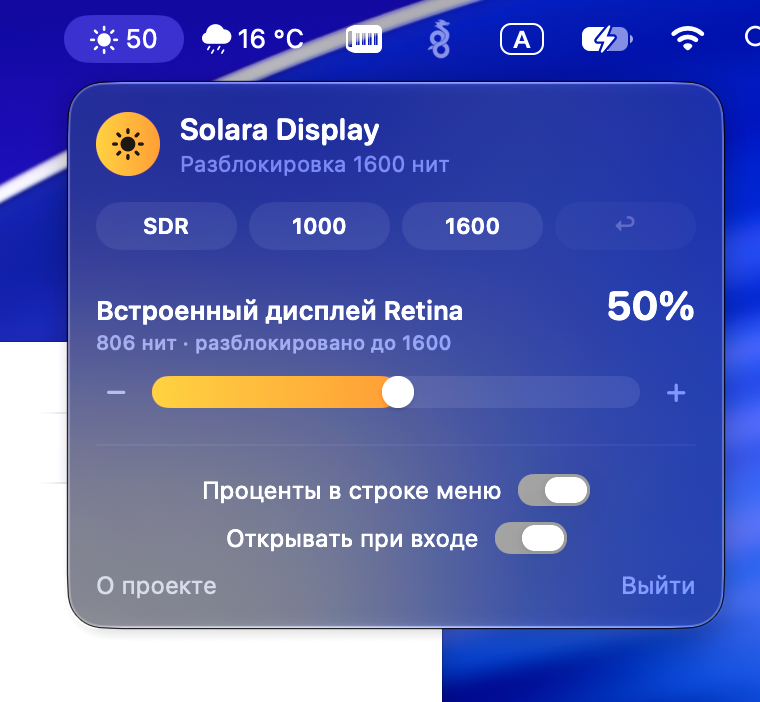
Lives in the menu bar. One slider per display, presets SDR / 1000 / 1600, brightness keys follow Solara’s scale — not system 100% SDR. External displays via DDC on Apple Silicon.
Built at kompaniec.com for 14″/16″ MacBook Pro 2021+ owners who need more than ~600 nits — photo, video, bright rooms.
At peak brightness the panel runs hotter and drains battery faster — Solara warns you. Optional percentage in the menu bar.
Features
Brightness keys + OSD with % and nits
Presets SDR / 1000 / 1600
Multi-display sync
Optional menu-bar percentage
External displays via DDC (Apple Silicon)
Peak-brightness warning
No Dock icon
Who it’s for
Owners of 14″/16″ MacBook Pro 2021+ with Liquid Retina XDR who need more than ~600 nits.
FAQ
Which Macs are supported?
MacBook Pro 14″/16″ 2021 and later with Liquid Retina XDR. Externals via DDC on Apple Silicon.
Is it safe for the display?
It uses the panel’s available range. At max the display runs hotter and battery drains faster — Solara warns about that.
Do I need a Dock icon?
No. Solara lives only in the menu bar.
How much does it cost?
Free to download. Built by Kompaniec.
Download Solara Display
Install via .dmg. Brightness in the menu bar in a second.